

Shopify पर Ecommerce Website क्यों बनाएं? Features, Cost और सही चुनाव की Guide 2026
Shopify ecommerce website के features, फायदे, limitations, cost, SEO, payments, security और सही platform selection को आसान Hindi में समझने वाली practical guide।
Online store शुरू करते समय सबसे बड़ा सवाल केवल यह नहीं होता कि website कैसी दिखेगी। असली सवाल है कि products upload करना, inventory संभालना, payment लेना, orders process करना, shipping connect करना और store को धीरे-धीरे scale करना कितना आसान होगा। Shopify इन्हीं कामों को एक managed ecommerce platform में जोड़ता है।
यह platform नए sellers, growing brands और established businesses—तीनों के लिए उपयोगी हो सकता है, लेकिन हर business के लिए automatically best choice नहीं है। सही फैसला monthly plan देखकर नहीं, बल्कि total cost, required customization, payment workflow, team capability और long-term growth plan देखकर करना चाहिए। यह guide Shopify को practical business perspective से समझाती है ताकि आप features के साथ limitations भी evaluate कर सकें।
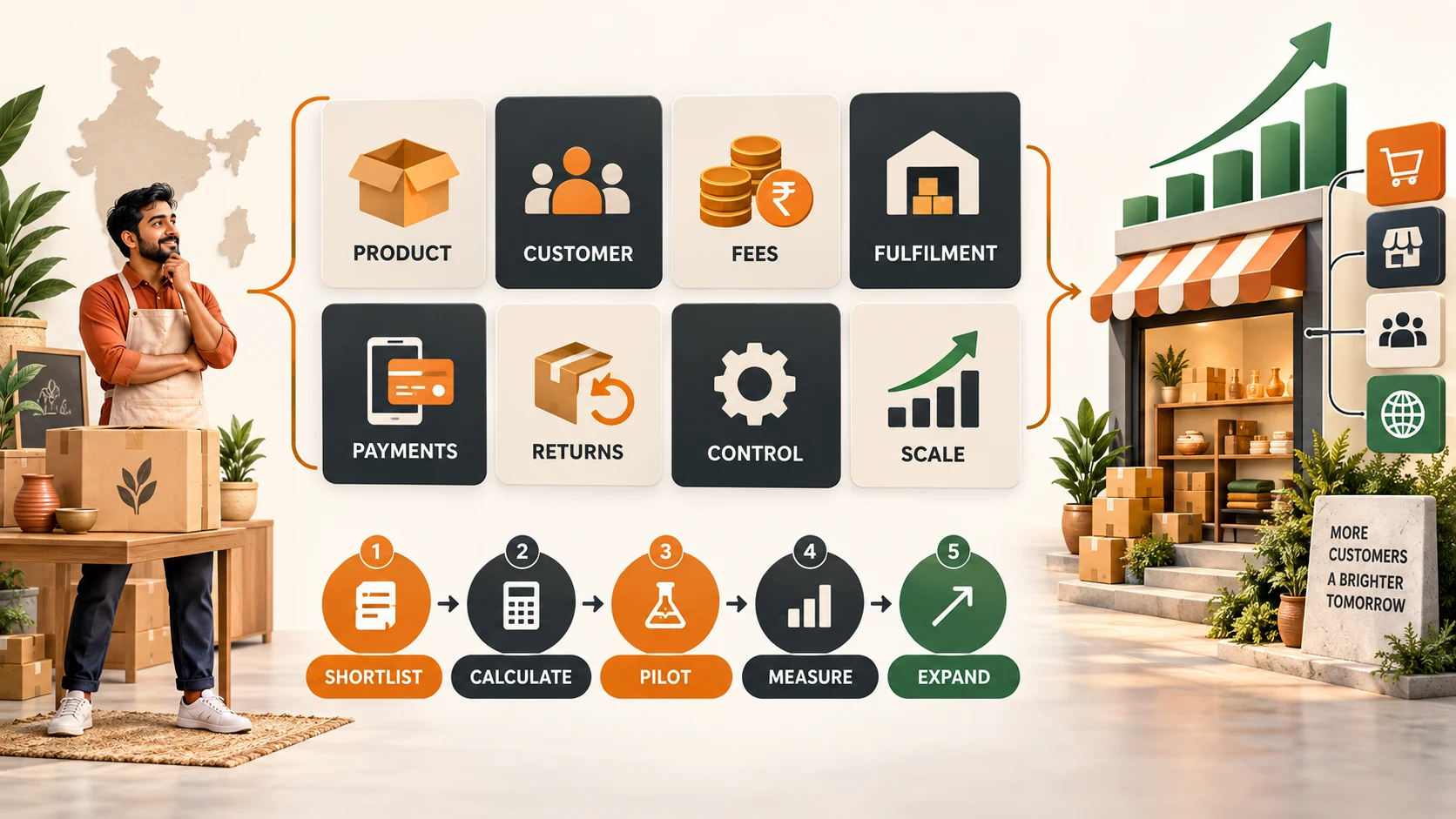
Shopify क्या है?
Shopify एक hosted ecommerce platform है जिसमें online store बनाने और चलाने के लिए dashboard, product catalogue, checkout, order management, customer records, themes, reports और integrations मिलते हैं। Hosting, core software updates और platform-level maintenance का बड़ा हिस्सा provider संभालता है। इसलिए merchant को server setup और routine technical maintenance पर कम समय देना पड़ सकता है।
इसे एक तैयार दुकान के infrastructure की तरह समझें। आपको products, branding, policies, pricing, shipping और marketing का निर्णय लेना होता है, जबकि basic commerce engine पहले से उपलब्ध रहता है। Advanced design या custom workflow के लिए developer की जरूरत फिर भी पड़ सकती है।
Shopify किन businesses के लिए useful हो सकता है?
- पहली branded ecommerce website launch करने वाले sellers।
- Social media या marketplace sales को अपने store पर लाना चाहने वाले brands।
- छोटी team वाले businesses जिन्हें आसान daily operations चाहिए।
- Multiple product variants, inventory और discount campaigns manage करने वाले stores।
- International customers तक पहुंचने की planning करने वाले merchants।
- ऐसे brands जो apps और integrations के जरिए features धीरे-धीरे बढ़ाना चाहते हैं।
यदि business को बहुत unusual checkout, highly customised backend या complex B2B pricing rules चाहिए, तो plan और app चुनने से पहले technical feasibility review जरूरी है।
Shopify चुनने के 10 practical reasons
1. Store management का आसान dashboard
Non-technical merchant भी products add कर सकता है, images और variants update कर सकता है, inventory देख सकता है और orders process कर सकता है। आसान interface launch time कम कर सकता है, लेकिन team को catalogue standards, image sizes, SKU naming और order-status workflow पहले तय करना चाहिए।
2. Themes से तेज शुरुआत
Ready themes की मदद से homepage, collection, product और cart pages जल्दी तैयार किए जा सकते हैं। Theme चुनते समय केवल visual appearance न देखें। Mobile speed, accessibility, menu depth, product filters, image handling और app compatibility भी check करें। Heavy animation और unnecessary sections conversion तथा performance दोनों को नुकसान पहुंचा सकते हैं।
3. Apps और integrations का ecosystem
Email marketing, reviews, loyalty, upsell, accounting, shipping और analytics जैसे कामों के लिए apps उपलब्ध होते हैं। इसका लाभ flexibility है, लेकिन हर app monthly cost, extra scripts और data access जोड़ सकती है। Install करने से पहले पूछें: क्या यह feature theme या existing plan में पहले से है? क्या app हटाने पर unwanted code या broken layout रह जाएगा?
4. Growth के साथ scale करने की क्षमता
Catalogue, traffic और order volume बढ़ने पर hosted infrastructure का लाभ मिलता है। फिर भी scalability केवल server capacity नहीं है। Inventory accuracy, fulfilment, customer support, returns और reporting process भी साथ में scale होने चाहिए। Website तेज हो लेकिन operations slow हों, तो customer experience फिर भी खराब रहेगा।
5. Mobile-friendly commerce
भारत में बड़ी संख्या में shoppers mobile से products discover और purchase करते हैं। Responsive themes mobile layouts provide करती हैं, पर merchant को real devices पर menu, search, filters, variant selection, payment और form fields test करने चाहिए। Product image का correct ratio और compressed format Core Web Vitals के लिए महत्वपूर्ण है।
6. Security और platform maintenance
Hosted model में core infrastructure, software maintenance और checkout security का बड़ा हिस्सा centrally managed होता है। इसका अर्थ यह नहीं कि merchant की security responsibility खत्म हो जाती है। Strong passwords, two-factor authentication, limited staff permissions, trusted apps और regular access review जरूरी हैं।
7. Payments और checkout workflow
Store को suitable payment provider के साथ connect किया जा सकता है। Final selection में transaction fees, settlement time, refunds, chargebacks, COD workflow और supported payment methods देखें। केवल payment logo दिखाई देना पर्याप्त नहीं; failed payment recovery और order confirmation flow भी test करें।
8. Built-in ecommerce SEO foundation
Page titles, meta descriptions, alt text, redirects और sitemap जैसी basic SEO सुविधाएं मिलती हैं। लेकिन organic ranking platform अपने आप नहीं देता। Unique category copy, useful product information, internal linking, canonical control, structured data, fast images और genuine reviews पर अलग से काम करना पड़ता है।
9. Centralised order और inventory view
Products, orders और customers एक dashboard में होने से small team के लिए coordination आसान हो सकता है। Multiple warehouses या sales channels होने पर inventory sync rules और source-of-truth स्पष्ट रखें। Overselling रोकने के लिए safety stock, returns और cancelled orders का process document करें।
10. Support resources और learning ecosystem
Documentation, community discussions और professionals का ecosystem troubleshooting में मदद कर सकता है। फिर भी किसी paid developer या agency को चुनते समय portfolio, relevant use cases, handover documentation, ownership और post-launch support लिखित रूप में तय करें।
Shopify store का वास्तविक खर्च कैसे calculate करें?
सिर्फ subscription देखकर budget बनाना अधूरा है। Total cost of ownership में नीचे दिए गए खर्च शामिल करें:
| Cost area | क्या शामिल करें? | कब बढ़ सकता है? |
|---|---|---|
| Platform plan | Monthly या annual subscription | Advanced reporting, staff या enterprise needs बढ़ने पर |
| Theme | Free या paid theme, design customisation | Custom sections और redesign की जरूरत पर |
| Apps | Reviews, email, loyalty, filters, shipping | Orders, contacts या usage-based billing बढ़ने पर |
| Payments | Gateway और transaction-related charges | Payment mix, refunds और international orders पर |
| Development | Setup, migration, integrations और maintenance | Custom workflows या third-party systems पर |
| Operations | Product photos, content, support और fulfilment | Catalogue और order volume बढ़ने पर |
| Marketing | Ads, creators, email और SEO | Customer acquisition competition बढ़ने पर |
एक simple spreadsheet में fixed और variable costs अलग रखें। फिर contribution margin निकालें: selling price से product cost, packaging, payment charge, shipping subsidy, return allowance और marketing cost घटाएं। Store platform profitable तभी है जब unit economics टिकाऊ हो।
Shopify, WooCommerce और custom website में अंतर
| Criteria | Shopify | WooCommerce | Custom build |
|---|---|---|---|
| Setup | Generally faster | Hosting और plugins configure करने होते हैं | Requirement और development पर निर्भर |
| Maintenance | Core platform managed | Updates, hosting और security merchant संभालता है | Dedicated technical ownership चाहिए |
| Customisation | Theme, apps और platform limits के भीतर | Plugins और code के जरिए flexible | सबसे अधिक control, पर अधिक complexity |
| Cost pattern | Subscription और app-based | Hosting, plugins और maintenance-based | Higher initial और ongoing development cost |
| Best suited | Fast, managed commerce launch | Content-heavy या WordPress-based stores | Unique workflows और large custom systems |
किसी platform को universal winner मानना सही नहीं है। यदि आपकी team WordPress और hosting management में comfortable है, तो WooCommerce useful हो सकता है। यदि workflow unique है और engineering budget पर्याप्त है, custom solution fit हो सकता है। Fast launch और managed operations priority हों तो Shopify मजबूत candidate है।
Shopify की limitations जिन्हें पहले समझना चाहिए
- Recurring cost: Plan के साथ apps और services का monthly bill बढ़ सकता है।
- Platform dependency: Store platform rules, feature limits और ecosystem पर निर्भर रहता है।
- Deep customisation: हर unique workflow standard theme या app से संभव नहीं होता।
- App overload: बहुत सारे apps speed, maintenance और data governance को complex बना सकते हैं।
- Migration effort: Products export हो सकते हैं, लेकिन theme logic, app data और custom workflows आसानी से transfer नहीं होते।
- SEO control: Common SEO tasks supported हैं, फिर भी URL architecture और advanced technical requirements में constraints हो सकती हैं।
Launch से पहले 12-point checklist
- Business name, domain और brand identity final करें।
- Product titles, descriptions, variants, SKU और images standardise करें।
- Shipping zones, rates और delivery estimates test करें।
- Payment success, failure, refund और COD workflow verify करें।
- Return, privacy, shipping और contact policies publish करें।
- Mobile menu, search, filters और checkout real phone पर test करें।
- Meta titles, descriptions, alt text और canonical output review करें।
- Analytics और conversion events correctly fire हो रहे हैं या नहीं देखें।
- Order confirmation email और customer notifications check करें।
- Staff accounts को minimum required permissions दें।
- Test order place करके fulfilment से refund तक पूरा flow चलाएं।
- Backup export और emergency contact process document करें।
Conversion बढ़ाने के लिए product page में क्या रखें?
High-quality image, clear product title और price basic requirements हैं। इसके बाद product benefits, material or specifications, size information, delivery expectation, return conditions, stock status और genuine reviews जोड़ें। Variant names customer-friendly रखें। Mobile पर primary action ऊपर दिखाई देना चाहिए, लेकिन aggressive popups या false urgency से trust कम न करें।
Frequently asked questions product-specific हों। उदाहरण: care instructions, compatibility, box contents, warranty, fit या installation। Generic FAQ को हर product पर repeat करने की जगह collection और policy pages से internal links दें।
Shopify SEO की practical strategy
- Keyword intent map करें: Product, category, comparison और informational queries अलग रखें।
- Collection pages मजबूत करें: Useful intro, filters और buying guidance दें।
- Duplicate content control करें: Variant, filter और tag URLs की indexability review करें।
- Image performance सुधारें: Correct dimensions, modern formats और lazy loading use करें।
- Internal links बनाएं: Guides से relevant categories और products connect करें।
- Structured data validate करें: Price, availability, image और review markup visible content से match होना चाहिए।
- Out-of-stock strategy रखें: Temporary stock-out पर page useful रखें और alternatives दिखाएं।
Online selling channels compare करने के लिए AFShop की India के Best Online Selling Platforms Guide और customer acquisition plan के लिए First 100 Customers Guide भी उपयोगी हैं।
Developer या agency चुनते समय क्या पूछें?
- क्या उन्होंने आपके catalogue size और business model जैसा store बनाया है?
- Theme licence, code और connected accounts का owner कौन होगा?
- Apps चुनने का criteria और monthly cost estimate क्या है?
- Performance, accessibility और SEO testing deliverables में शामिल हैं?
- Launch के बाद bug support कितने समय का है?
- Training और handover documentation मिलेगी?
- Future migration के लिए data export process क्या होगा?
Final decision framework
Shopify चुनें यदि आपको relatively fast launch, managed infrastructure, easy catalogue operations और integrations का ecosystem चाहिए। Alternative देखें यदि आपका checkout या backend workflow अत्यधिक custom है, recurring app cost business margin पर भारी पड़ती है, या team को complete infrastructure control चाहिए।
Platform केवल foundation है। Sustainable ecommerce business सही products, honest information, reliable delivery, responsive support, profitable unit economics और repeat customers से बनता है। पहले requirements लिखें, दो या तीन platforms का realistic cost comparison करें, demo store पर critical workflows test करें और उसके बाद ही long-term commitment लें।
Sources and verification
Found an error? Review our Corrections Policy or contact the editorial team.
Article at a glance
| Written by | Ananya Iyer |
|---|---|
| Published | 02 Oct 2026, 09:30 AM IST |
| Reading time | 10 minutes |
| Topic | Ecommerce research and practical guidance |
Frequently Asked Questions
क्या Shopify beginners के लिए suitable है?
हाँ, इसका managed dashboard और ready themes beginners के लिए setup आसान बना सकते हैं। फिर भी products, policies, payments, shipping और unit economics की business planning merchant को करनी होती है।
क्या Shopify store बिना developer के बनाया जा सकता है?
Basic store theme और standard features के साथ बनाया जा सकता है। Custom design, complex integrations, migration या performance work के लिए experienced developer उपयोगी हो सकता है।
Shopify का total cost कैसे calculate करें?
Plan के साथ theme, apps, payment charges, development, content, shipping operations और marketing cost जोड़ें। फिर contribution margin के आधार पर affordability evaluate करें।
क्या Shopify SEO-friendly है?
यह meta tags, redirects, sitemap और basic technical foundation देता है। Ranking के लिए unique content, internal linking, fast images, structured data और useful product information पर अलग से काम करना पड़ता है।
Shopify और WooCommerce में कौन बेहतर है?
Managed setup और आसान operations priority हों तो Shopify useful है। WordPress control और self-managed flexibility चाहिए तो WooCommerce fit हो सकता है। सही choice team skills, budget और requirements पर निर्भर है।
क्या बहुत सारे Shopify apps install करना सही है?
नहीं। हर app cost, scripts और data access जोड़ सकती है। केवल measurable business need वाले apps रखें और समय-समय पर usage तथा performance review करें।
Shopify पर mobile store automatically perfect होता है?
Responsive theme foundation देती है, लेकिन real devices पर menu, filters, images, variants, payments और checkout test करना जरूरी है।
Shopify चुनने से पहले सबसे जरूरी check क्या है?
Critical workflows का demo test, three-year cost estimate, payment and shipping compatibility, data ownership, customization limits और migration plan verify करें।

Ananya Iyer
Online Commerce WriterAnanya covers online commerce, customer trust and the information readers need before acting on a deal or recommendation.
View author profileRead More Blogs

Meesho Dropshipping 2026: बिना Heavy Inventory Selling कैसे शुरू करें?
Meesho पर low-inventory selling का practical Hindi guide: seller registration, supplier selection, stock sync, catalog, packing, returns, unit economics और compliant scaling।
23 · Read blog
Zomato Orders क्यों नहीं बढ़ रहे? Impression से Repeat Order तक Complete Funnel Guide
Zomato orders बढ़ाने के लिए impression, menu open, cart, accepted order, delivery, contribution और repeat customer का complete data-driven funnel समझें।
16 · Read blog
India के 30 Best Online Selling Platforms: Sellers के लिए Complete 2026 Guide
India में products online बेचने के लिए 30 marketplaces, niche channels, B2B networks, social commerce और own-store platforms की practical Hindi comparison।
14 · Read blog
Customers कैसे पाएं? First 100 Customers की Acquisition Guide 2026
Small business के लिए customers पाने की practical Hindi guide: ICP, offer, outreach, referrals, partnerships, content, sales pipeline, CAC और 90-day roadmap।
9 · Read blog
Comments 0
No comments yet. Be the first to share a useful thought.
Leave a comment
Your email address will not be published. Comments are reviewed before appearing. Web addresses are displayed as plain text and are never clickable.