
Flipkart Seller Hub Guide: Listings, Orders, Inventory और Analytics कैसे Manage करें?
Flipkart Seller Hub को daily business command centre की तरह कैसे use करें? Listings, orders, inventory, pricing, Ads, payments, returns, support और business insights के लिए practical daily, weekly और monthly workflow आसान हिंदी में समझें।
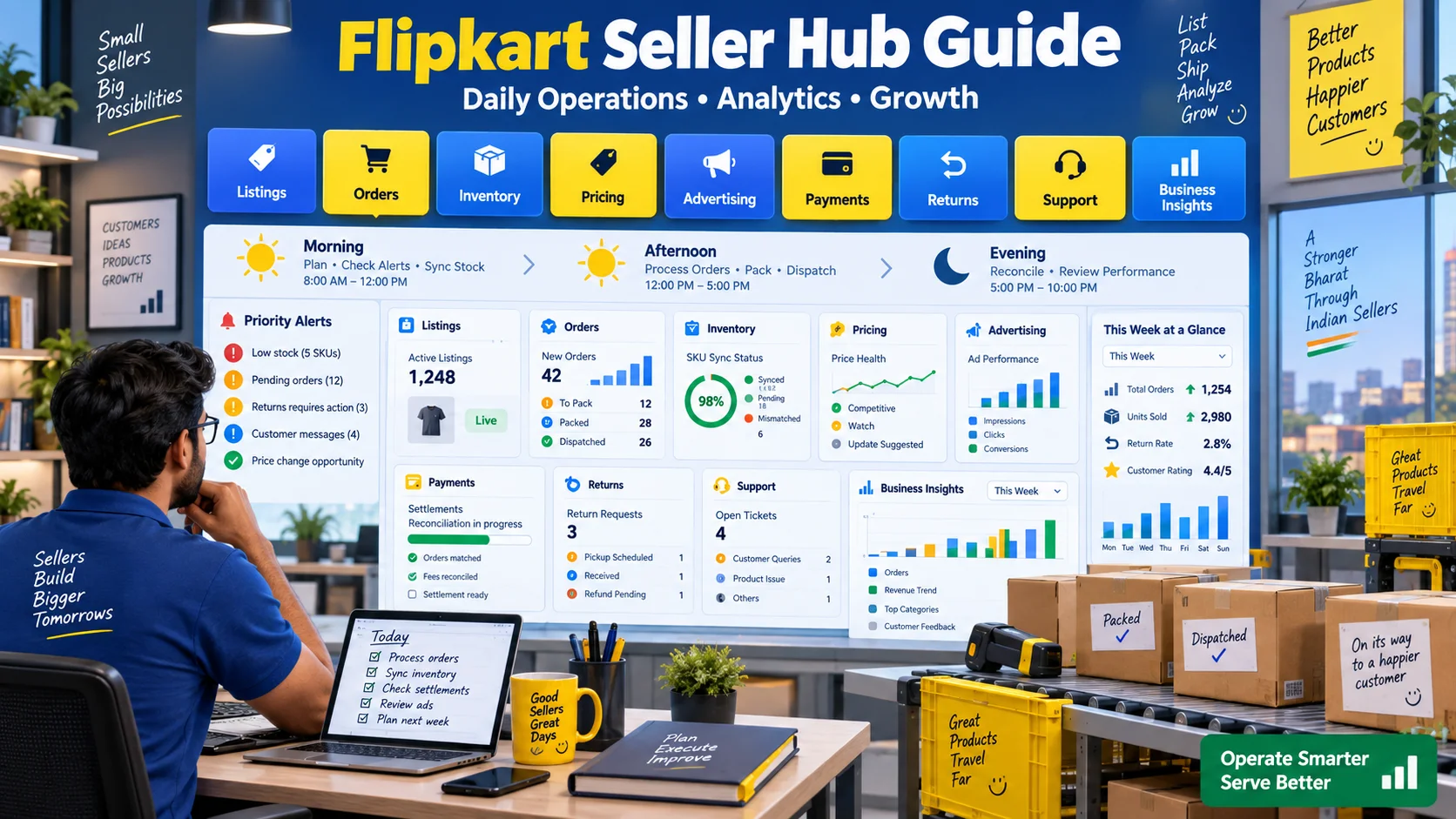
Flipkart Seller Hub केवल products upload करने का dashboard नहीं है। यह seller के marketplace business का command centre है—जहां listings, orders, inventory, pricing, advertising, payments, returns, support और performance insights manage किए जा सकते हैं। Dashboard में data बहुत होता है, लेकिन growth तब आती है जब seller उसे नियमित operating routine में बदलता है।
एक seller के लिए सबसे बड़ा challenge feature की कमी नहीं, बल्कि priority की कमी होती है। सुबह कौन-सा alert पहले देखें? Stock कब update करें? Orders किस क्रम में process करें? Ads को sales से नहीं, profit से कैसे compare करें? Settlement mismatch कैसे खोजें? यह guide इन्हीं operational सवालों का structured answer देती है।
Flipkart Seller Hub में क्या-क्या manage किया जा सकता है?
Flipkart की official seller information के अनुसार Seller Hub और Seller Hub App sellers को listings create/manage करने, orders और fulfilment handle करने, inventory track करने, payments, advertising, business insights और support access करने में मदद करते हैं। Exact menu names और availability account, category या current platform version के अनुसार बदल सकती है।
| Seller Hub area | मुख्य काम | मुख्य risk |
|---|---|---|
| Listings | Product details, attributes, status और catalogue quality | Wrong variant, missing attributes, inactive listing |
| Orders | Pick, pack, label और dispatch workflow | Late dispatch, cancellation, wrong item |
| Inventory | SKU और location-wise stock | Overselling, stockout, stale quantity |
| Pricing | Selling price, MRP और recommendations | Margin loss या uncompetitive offer |
| Advertising | Campaign, budget और performance | Low-quality traffic, overspend, out-of-stock ads |
| Payments | Settlements, fees और reconciliation | Unmatched order, fee या return adjustment |
| Returns | Return tasks और reason analysis | Repeated defects और unresolved claims |
| Insights | Sales और operational trends | Revenue देखकर profit assume करना |
| Support | Tickets और policy assistance | Incomplete evidence या missed follow-up |
Seller Hub खोलते ही सबसे पहले क्या देखें?
Dashboard की हर card को समान priority देने की जरूरत नहीं है। सबसे पहले ऐसे alerts देखें जो customer order, account health या money को तुरंत प्रभावित कर सकते हैं।
- Dispatch deadlines: आज किन orders को pack और handover करना जरूरी है?
- Low stock: कौन-से active या advertised SKUs stockout के करीब हैं?
- Listing errors: कौन-सी high-selling listing inactive या suppressed हुई?
- Return tasks: किस request की action deadline करीब है?
- Payment exceptions: कोई settlement, fee या refund mismatch तो नहीं?
- Support escalations: Open ticket में नया response या requested evidence तो नहीं?
Low-impact recommendations बाद में देखी जा सकती हैं। पहले वह काम करें जिसका deadline miss होने पर order cancellation, account action या customer complaint हो सकती है।
Daily Seller Hub routine: सुबह से शाम तक
| समय | मुख्य actions | Expected output |
|---|---|---|
| सुबह | Alerts, pending orders, stock sync, listing status | Clear priority list और accurate availability |
| दोपहर | Pick, pack, labels, dispatch, support issues | Orders deadline से पहले ready |
| शाम | Returns, payments, Ads spend और performance check | Exceptions logged और next-day actions |
| दिन खत्म होने से पहले | Stock recount, failed updates, pending tickets | No hidden operational backlog |
1. Listings section को catalogue control centre बनाएं
Listing केवल product title और image नहीं है। Flipkart Listing Management documentation के अनुसार listing sellable unit है और SKU, package तथा fulfilment location जैसी entities से जुड़ सकती है। Seller price, MRP, stock, procurement SLA, HSN और shipping-related attributes manage कर सकता है, subject to current rules and permissions.
Listing audit checklist
- SKU ID unique और internal system से match करता है।
- Correct category और required attributes complete हैं।
- Title selected variant को accurately describe करता है।
- Main image और additional images actual product दिखाती हैं।
- MRP और selling price सही हैं।
- Package dimensions और weight वास्तविक हैं।
- Stock और procurement SLA operational reality से match करते हैं।
- Listing status expected location पर active है।
- Warranty, compatibility और package contents स्पष्ट हैं।
- Prohibited claim या trademark misuse नहीं है।
High-selling SKUs का audit weekly करें और long-tail catalogue को rotation में monthly review करें। सभी listings एक ही दिन manually edit करने से error risk बढ़ता है। Batch changes के बाद sample और exception report जरूर check करें।
2. Orders को shipment workflow से समझें
Flipkart की Order Management API documentation order, order item और shipment में अंतर बताती है। एक customer order में कई products हो सकते हैं और वे अलग sellers या shipments में fulfil हो सकते हैं। Shipment वह logical unit है जिसे seller pick, pack और logistics partner को handover करता है।
Positive inventory होने पर order assigned हो सकता है और seller को allocated location से fulfil करना होता है। इसलिए “stock system में है लेकिन shelf पर नहीं” गंभीर operational gap है।
Safe order-processing sequence
- Pending shipments को dispatch deadline के अनुसार sort करें।
- SKU, variant और quantity pick list से verify करें।
- Barcode या two-step check से wrong item रोकें।
- Product condition और accessories inspect करें।
- Category-appropriate secure packaging करें।
- Correct label सही shipment पर लगाएं।
- Required status update या Ready to Dispatch action समय पर करें।
- Handover proof और exception notes retain करें।
Bulk volume में pick-to-light या barcode system useful हो सकता है, लेकिन small seller भी simple bin locations और second-person verification से errors घटा सकता है।
3. Inventory section में केवल quantity नहीं, accuracy manage करें
Inventory accuracy का अर्थ Seller Hub number और physically sellable stock का match होना है। Damaged, reserved, returned-but-unchecked या misplaced units को available stock मानना overselling का कारण बन सकता है।
Stock buckets बनाएं
- Sellable: तुरंत order fulfil करने योग्य।
- Reserved: Existing orders या transfers के लिए blocked।
- Damaged: Sale के योग्य नहीं।
- Return pending QC: Inspection के बाद ही sellable हो सकता है।
- In transit: Supplier या warehouse transfer में।
Official Listing APIs stock को location level पर get/update करने की capability बताती हैं। Integration use करते समय successful HTTP response ही पर्याप्त नहीं है—SKU-wise warnings, unavailable IDs और partial failures log करें।
Daily inventory controls
- Top sellers का opening stock और closing stock compare करें।
- Low-stock threshold SKU velocity के अनुसार रखें।
- Ads में शामिल product के लिए extra buffer रखें।
- Cancelled order का stock कब वापस available हुआ, verify करें।
- Multi-channel stock एक central source से sync करें।
- Negative या unexpectedly high stock alerts बनाएं।
4. Pricing tools का उपयोग margin guardrail के साथ करें
Seller Hub में price recommendation useful reference हो सकती है, लेकिन recommendation आपके supplier cost, returns और advertising expense नहीं जानती। Automatic या frequent pricing changes से पहले minimum profitable price तय करें।
Minimum safe price = Product cost + marketplace/fulfilment charges + packaging + expected return cost + desired contribution
MRP, selling price और discount का relationship truthful होना चाहिए। Price update के बाद listing पर displayed price और offer verify करें। API या bulk upload में decimal, currency और SKU mapping error large loss कर सकता है।
5. Advertising dashboard को profit dashboard से जोड़ें
Ads dashboard impressions, clicks, spend और attributed orders दिखा सकता है। लेकिन seller को ad metrics के साथ product margin, organic sales, returns और stock cover भी देखना चाहिए। High ROAS listing जरूरी नहीं कि highest profit दे, और low ROAS campaign हमेशा खराब नहीं होती अगर वह new product discovery test है।
| Signal | Possible meaning | Next check |
|---|---|---|
| High impressions, low clicks | Image, title, relevance या price कमजोर | Search context और competitor presentation |
| High clicks, low orders | Listing trust, reviews, price या delivery issue | Product page conversion factors |
| Orders बढ़े, profit नहीं | Ad cost, discount या return loss अधिक | SKU-level contribution |
| Campaign अच्छा, stock कम | Stockout और wasted demand risk | Replenishment और budget cap |
| Sales event spike | Temporary demand | Post-event baseline और repeat demand |
Ads strategy की विस्तृत जानकारी के लिए Flipkart पर sales बढ़ाने की 10 strategies guide पढ़ें। यह Seller Hub article operations पर केंद्रित है, जबकि वह article growth levers समझाता है।
6. Payments और settlements की reconciliation करें
Total orders और bank credit समान नहीं होते। Settlement में applicable marketplace charges, shipping/fulfilment, taxes, returns, cancellations, refunds और adjustments शामिल हो सकते हैं। Seller को order-to-settlement reconciliation रखना चाहिए।
Reconciliation table में ये fields रखें
- Order ID और order item ID
- SKU और quantity
- Order date और dispatch date
- Selling price और discount
- Applicable fees और taxes
- Return/refund status
- Expected settlement
- Actual settlement और bank date
- Difference और reason
Daily high-level check और weekly detailed reconciliation रखें। हर small timing difference को loss न मानें; settlement cycle और pending adjustments समझें। Unexplained mismatch के लिए evidence के साथ support ticket बनाएं।
7. Returns dashboard को product-quality feedback बनाएं
Return केवल reverse shipment नहीं है। हर return reason sourcing, catalogue, packing या fulfilment improvement का signal हो सकता है। Reasons को normalized categories में रखें:
- Wrong product या wrong variant
- Damaged in transit
- Defective product
- Size/fit issue
- Product description mismatch
- Missing item/accessory
- Compatibility problem
- Customer preference या no longer needed
Returned unit को QC के बिना sellable stock में वापस न डालें। High-return SKU पर Ads बढ़ाना problem को scale कर सकता है। पहले root cause fix करें।
8. Business Insights से action निकालें
Dashboard chart तभी valuable है जब उससे decision निकले। केवल sales total देखने के बजाय SKU, category, location, fulfilment type और time period के अनुसार patterns देखें।
Weekly business review
| Question | Metric | Action |
|---|---|---|
| कौन-से SKUs demand ला रहे हैं? | Units, revenue, conversion | Stock और visibility plan |
| कौन-से SKUs profit दे रहे हैं? | Contribution after ads/returns | Scale, hold या exit |
| कहां service कमजोर है? | Late dispatch, cancellation, returns | Process fix और training |
| Ads कहां waste हो रही हैं? | Spend without profitable orders | Bid, product या campaign change |
| Cash कहां अटका है? | Inventory days और settlement ageing | Replenishment या reconciliation |
Metrics और ecommerce funnel की विस्तृत समझ के लिए AFShop ecommerce metrics guide helpful है।
9. Support tickets को evidence-based बनाएं
“Listing नहीं चल रही” या “payment गलत है” जैसा vague ticket resolution धीमा कर सकता है। Clear ticket में issue summary, affected IDs, timestamps, screenshots, expected behaviour, actual behaviour और already-tried steps लिखें।
Useful support-ticket format
- Subject: Specific problem और affected area।
- Seller/SKU/Order ID: केवल relevant identifiers।
- Issue started: Date और time with timezone।
- Expected: क्या होना चाहिए था?
- Actual: क्या हुआ?
- Evidence: Screenshot, report या error message।
- Impact: कितने orders/listings प्रभावित हैं?
- Request: किस resolution की जरूरत है?
Sensitive credentials, OTP या unnecessary customer data ticket में share न करें।
10. Seller Hub App का सही उपयोग
Seller Hub App mobile पर alerts, orders और quick checks के लिए useful है। लेकिन complex bulk edits, reconciliation या large reports desktop पर ज्यादा safely handle हो सकते हैं। Mobile access के लिए device lock, official app source और account security रखें।
App notifications को priority के अनुसार configure करें। हर notification on रखने से alert fatigue हो सकती है और critical dispatch alert सामान्य promotion में खो सकता है।
Daily, weekly और monthly cadence
| Frequency | Must-do checks |
|---|---|
| Daily | Orders, dispatch deadlines, stock, listing errors, returns और urgent tickets |
| Twice daily | Fast-moving SKU stock और advertised product availability |
| Weekly | SKU profitability, Ads, ratings, returns, settlements और support backlog |
| Monthly | Catalogue audit, supplier performance, slow inventory, fee trends और category strategy |
| Before events | Demand forecast, stock buffer, pricing, operations capacity और Ads plan |
| After events | Profit, returns, service failures और repeat-demand analysis |
कब external OMS या ERP की जरूरत पड़ सकती है?
Small catalogue और single marketplace को Seller Hub में directly manage किया जा सकता है। लेकिन multiple marketplaces, stores, warehouses या thousands of SKUs होने पर manual sync error-prone हो सकती है। External Order Management System, Inventory Management System या ERP तब useful हो सकता है जब वह real business problem solve करे।
Integration से पहले questions
- System Flipkart की current approved integration method use करता है?
- Stock का single source of truth कौन होगा?
- Partial API failure कैसे retry होगी?
- Duplicate orders या SKU mappings कैसे detect होंगे?
- Price update पर minimum margin guardrail है?
- Audit log और user permissions उपलब्ध हैं?
- Token और customer data securely store होते हैं?
- System down होने पर manual fallback क्या है?
- Reconciliation और tax workflows आपके accountant ने approve किए हैं?
किसी vendor के growth claims को guaranteed result न मानें। Demo अपने real SKU volume, warehouse workflow और exception cases पर test करें।
API integration में कौन-से controls जरूरी हैं?
Flipkart Developer documentation listings, inventory, price, orders और reports के लिए APIs बताती है। Automation scale देता है, लेकिन data mistake भी scale कर सकता है।
- Sandbox या limited SKUs पर test करें।
- Request और response logs रखें, credentials mask करें।
- SKU-wise success, warning और failure अलग store करें।
- Rate limits और transient errors पर controlled retry रखें।
- Validation error blindly retry न करें।
- Inventory update idempotent बनाएं।
- Price changes पर maximum percentage limit रखें।
- Bulk deactivate action पर human approval रखें।
- Daily mismatch report बनाएं।
Seller Hub mistakes जिनसे बचना चाहिए
- Dashboard alerts कई दिनों तक ignore करना।
- Physical stock verify किए बिना inventory बढ़ाना।
- Wrong variant पर price या stock update करना।
- Ads चलाना लेकिन replenishment plan न रखना।
- Revenue को profit मान लेना।
- Returned unit को QC के बिना resell करना।
- Settlement difference document न करना।
- Support ticket में evidence न देना।
- Bulk change के बाद sample QA न करना।
- ERP या integration को unrestricted control देना।
7-day Seller Hub setup plan
Day 1: Dashboard और access
Roles, notifications, account security और priority alerts set करें। Team में किस module का owner कौन है, तय करें।
Day 2: Listing audit
Top SKUs की category, attributes, images, price, package data और active status verify करें।
Day 3: Inventory control
Physical count, low-stock thresholds, damaged stock और replenishment lead time map करें।
Day 4: Order SOP
Pick-pack-label-dispatch checklist और cutoff responsibilities document करें।
Day 5: Payments और returns
Reconciliation sheet तथा return-reason categories बनाएं।
Day 6: Ads और insights
Retail-ready SKUs चुनें, baseline metrics save करें और budget guardrail बनाएं।
Day 7: Review meeting
Exceptions, ownership gaps और next-week improvement actions finalize करें।
निष्कर्ष
Flipkart Seller Hub की value केवल उसके features में नहीं, बल्कि seller की operating discipline में है। सुबह critical alerts और inventory, दिन में fulfilment, शाम को returns और payments, तथा weekly profitability review—यह cadence dashboard को actionable business system बनाती है।
Listings accurate रखें, stock को physical reality से sync करें, orders deadlines से पहले process करें, Ads को profit से जोड़ें और settlements reconcile करें। Business scale होने पर integration useful हो सकती है, लेकिन permissions, error handling और audit controls के बिना automation नया risk बन सकती है।
Article at a glance
| Written by | Pooja Sharma |
|---|---|
| Published | 27 Sep 2026, 09:35 PM IST |
| Reading time | 13 minutes |
| Topic | Ecommerce research and practical guidance |
Frequently Asked Questions
Flipkart Seller Hub क्या है?
Seller Hub listings, orders, inventory, pricing, advertising, payments, returns, insights और support manage करने का seller portal है। Available menus account और category के अनुसार बदल सकते हैं।
Seller Hub खोलते ही सबसे पहले क्या देखना चाहिए?
Dispatch deadlines, low stock, high-selling listing errors, return tasks, payment exceptions और urgent support updates को पहले देखें।
Inventory number और physical stock अलग हो तो क्या करें?
नई sales से पहले mismatch investigate करें। Damaged, reserved और return-pending units को sellable stock से अलग रखें और correct quantity update करें।
Ads performance को कैसे evaluate करें?
Impressions और ROAS के साथ conversion, contribution margin, return rate और stock cover देखें। Revenue बढ़ने का अर्थ profit बढ़ना जरूरी नहीं है।
Settlement reconciliation में क्या match करना चाहिए?
Order ID, SKU, selling price, fees, taxes, returns, refunds, expected settlement और actual bank credit को order level पर match करें।
कब external OMS या ERP उपयोगी है?
Multiple marketplaces, warehouses या large SKU catalogue में centralized inventory, orders और reconciliation के लिए useful हो सकता है। पहले integration controls और total cost verify करें।
Flipkart API integration में सबसे जरूरी safety control क्या है?
SKU-wise error handling, audit logs, limited permissions, price guardrails, idempotent inventory updates और bulk changes पर human approval जरूरी हैं।
Seller Hub का review कितनी बार करना चाहिए?
Orders और critical alerts daily, fast-moving stock दिन में एक से अधिक बार, profitability और Ads weekly तथा full catalogue और supplier performance monthly review करें।

Pooja Sharma
Ecommerce Analytics WriterPooja explains ecommerce analytics in plain English, helping buyers and sellers understand discovery, conversion, fulfilment, returns and customer loyalty metrics.
View author profileRead More Blogs

Meesho पर Online Selling कैसे शुरू करें? Registration, Catalog, Pricing और Growth की Complete 2026 Guide
Meesho seller registration से catalog, pricing, packing, delivery, payment, returns और growth तक का practical step-by-step Hindi playbook—नए और छोटे sellers के लिए।
5 · Read blog
Flipkart New Seller Guide: पहले 90 दिनों में Sales कैसे शुरू और Grow करें?
नए Flipkart seller के लिए first 90 days का practical Hindi roadmap। Account readiness, starter catalogue, listings, pricing, inventory, first orders, Ads, reviews, returns और weekly growth system समझें।
5 · Read blog
India के 30 Best Online Selling Platforms: Sellers के लिए Complete 2026 Guide
India में products online बेचने के लिए 30 marketplaces, niche channels, B2B networks, social commerce और own-store platforms की practical Hindi comparison।
4 · Read blog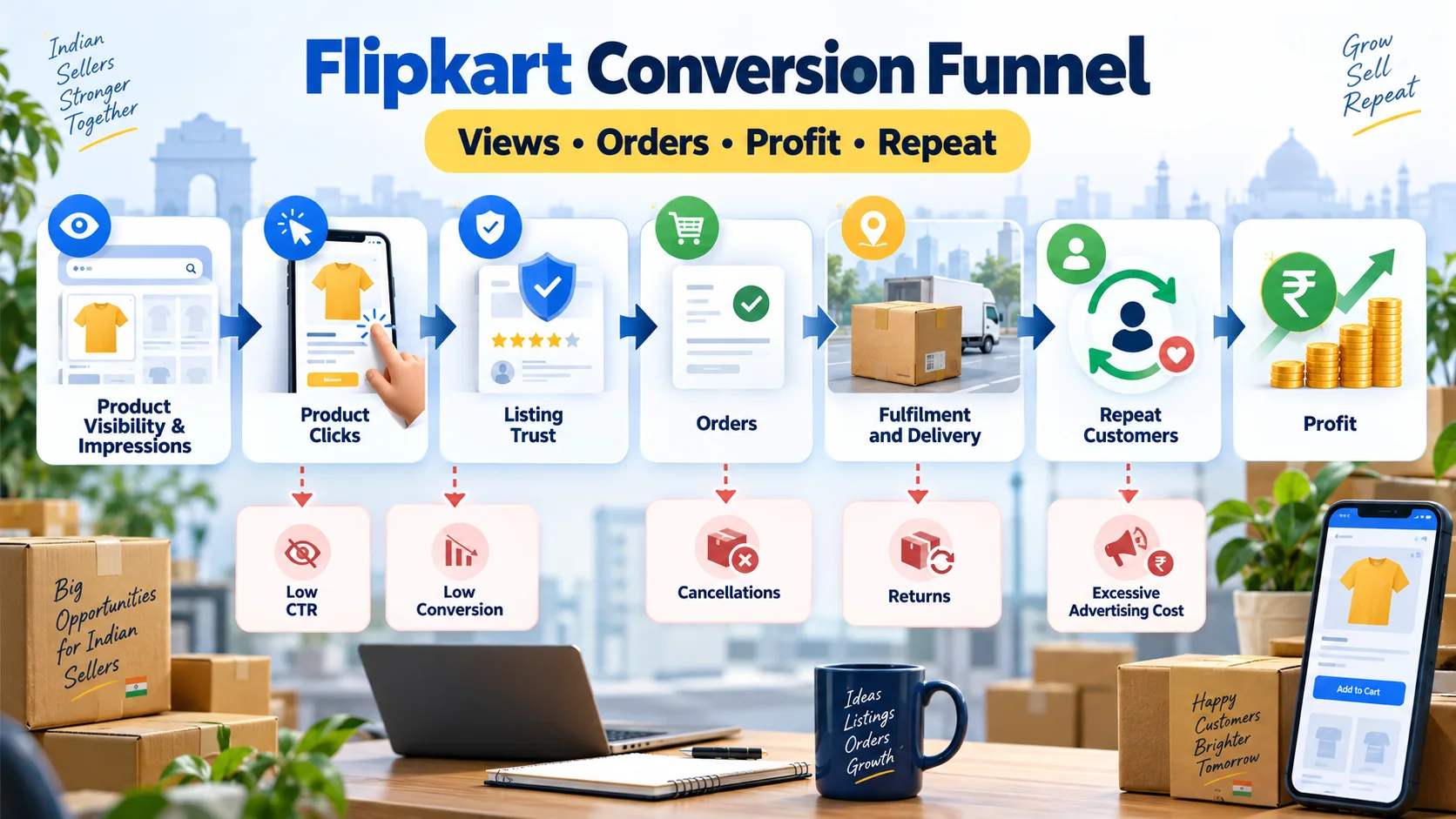
Flipkart Conversion Funnel कैसे सुधारें? Views से Profitable Sales तक Complete Guide
Flipkart पर impressions और clicks को profitable orders में बदलने की practical Hindi guide। CTR, conversion, cancellations, returns, ad ROAS, contribution margin और repeat demand को सही क्रम में समझें।
4 · Read blog
Comments 0
No comments yet. Be the first to share a useful thought.
Leave a comment
Your email address will not be published. Comments are reviewed before appearing. Web addresses are displayed as plain text and are never clickable.