
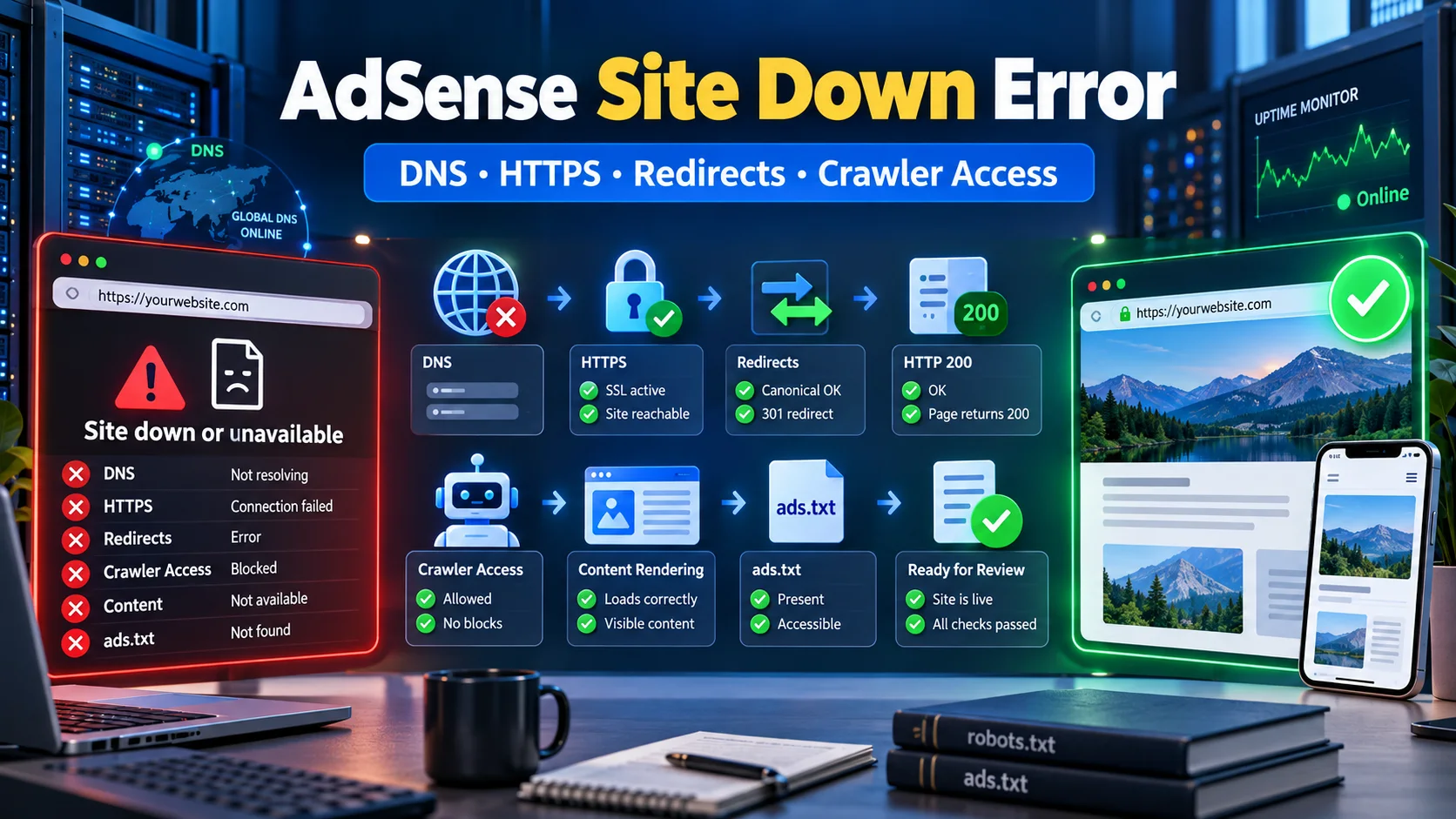
Google AdSense “Site Down or Unavailable” Error कैसे Fix करें? Complete Guide
AdSense review में Site down or unavailable error आने पर DNS, HTTPS, www redirects, HTTP status, robots.txt, firewall, rendering, ads.txt और review readiness को step-by-step diagnose करें।
Google AdSense में “Site down or unavailable” message आने का अर्थ हमेशा यह नहीं कि website हर visitor के लिए बंद है। Site आपके browser में खुल सकती है लेकिन AdSense crawler किसी अलग hostname, protocol, IP version, user-agent या geographic route से उसे access न कर पा रहा हो। कभी server 200 status देता है लेकिन body में maintenance या error page होती है; कभी HTTP और www versions canonical HTTPS URL पर redirect नहीं होते।
इस error को guesswork से नहीं, evidence से solve करें। यह guide DNS से rendered content तक पूरी request chain जांचती है। पुराने troubleshooting workflows और universal robots templates को current setup पर blindly apply नहीं करना चाहिए। Official Google documentation और actual server responses को priority दें।
Error किन technical layers से जुड़ा हो सकता है?
| Layer | Failure example | Test |
|---|---|---|
| Submitted URL | Typo, wrong subdomain या path | AdSense Sites entry compare करें |
| DNS | A/AAAA/CNAME resolve नहीं होता | Multiple public resolvers से lookup |
| TLS/HTTPS | Expired या hostname mismatch | Certificate और HTTPS request |
| Redirects | Loop, long chain या wrong destination | चार URL variants की trace |
| Server | 403, 429, 5xx या timeout | Status और response time |
| Crawler access | robots.txt/WAF bot block | Rules और security logs |
| Rendering | Blank page या soft 404 | Source और rendered page |
| Connection | AdSense code missing | Live head/source inspect करें |
1. Submitted URL verify करें
Official AdSense connection guidance correct URL, published site, password-free access और crawler availability check करने को कहती है। Domain spelling, extension और selected site देखें। Old staging subdomain, accidental path, wrong www variant या HTTP-only entry को correct करें। Site entry गलत हो तो current Google instructions के अनुसार correct domain add करें।
2. चार URL variants test करें
http://example.com/http://www.example.com/https://example.com/https://www.example.com/
एक preferred canonical version चुनें। बाकी variants को short server-side 301 या 308 redirect से उसी destination पर भेजें। Google Search documentation permanent redirect को strong canonical signal मानती है। JavaScript redirect पर निर्भर न रहें जब server-side redirect possible हो।
| Source | Expected response | Destination |
|---|---|---|
| HTTP non-www | 301/308 | Preferred HTTPS hostname |
| HTTP www | 301/308 | Preferred HTTPS hostname |
| Alternate HTTPS | 301/308 | Preferred HTTPS hostname |
| Preferred HTTPS | 200 | Full public content |
HTTP → HTTPS-www → HTTPS-non-www जैसी multiple hops और redirect loops avoid करें। HTTPS से HTTP downgrade नहीं होना चाहिए।
3. DNS और IPv4/IPv6 जांचें
आपके ISP cache में domain resolve होना global availability prove नहीं करता। Authoritative nameservers, A, optional AAAA और www CNAME/A record check करें। अगर AAAA record मौजूद है लेकिन server IPv6 पर respond नहीं करता, crawler का IPv6 request fail हो सकता है।
| DNS check | Expected | Risk |
|---|---|---|
| Nameservers | Correct authoritative provider | Stale delegation |
| A record | Active IPv4 server | Old hosting IP |
| AAAA record | Working IPv6 या absent | Broken IPv6 route |
| www record | Correct CNAME/A | NXDOMAIN/different site |
| Propagation | Resolvers agree | Mixed records |
4. SSL certificate और HTTPS chain
Certificate दोनों hostnames cover करे यदि दोनों HTTPS variants publicly reachable हैं, भले एक redirect हो। Validity dates, SAN hostnames, intermediate certificate chain और SNI check करें। Redirecting hostname पर SSL error आने से crawler redirect destination तक पहुंचने से पहले fail हो सकता है।
5. HTTP status और response body साथ देखें
Google crawling documentation के अनुसार 2xx response processing में जा सकता है; 4xx content use नहीं होता और 5xx/timeout availability problem है। केवल browser screenshot पर्याप्त नहीं—headers और body inspect करें।
| Status | Meaning | Action |
|---|---|---|
| 200 | Request successful | Body में real content verify करें |
| 301/308 | Permanent redirect | Final valid 200 तक जाए |
| 302/307 | Temporary redirect | Canonical setup review करें |
| 403 | Access denied | WAF/security rule check |
| 404 | Not found | URL या routing fix |
| 429 | Rate limited | Crawler throttling inspect |
| 500–504 | Backend failure | Application/server diagnose |
Soft 404 में server 200 देता है लेकिन page blank, “site unavailable”, database error या placeholder content दिखाता है। Google rendered content को error मान सकता है।
6. robots.txt में crawler block न हो
Official AdSense Help के अनुसार Mediapartners-Google को disallow करने पर crawler content access नहीं कर पाएगा। यह blocking rule remove करें: User-agent: Mediapartners-Google के साथ Disallow: /। हर site के लिए universal robots.txt copy न करें; existing rules समझकर edit करें।
Sitemap search discovery में useful है, लेकिन AdSense site-down error का direct universal fix नहीं। Primary requirement है कि submitted site publicly reachable और crawler-accessible हो।
7. CDN, firewall और bot protection
Security service normal browser को allow लेकिन crawler, datacenter traffic या particular country को block कर सकती है। Official AdSense crawler troubleshooting WAF block को possible cause बताती है।
- 403/429 events और firewall logs inspect करें।
- JavaScript challenge, CAPTCHA और bot rules check करें।
- Homepage और assets पर rate limits बहुत strict न हों।
- User-agent spoof देखकर blindly whitelist न करें; verified methods use करें।
- Maintenance mode पूरी public site पर active न हो।
- Origin server CDN requests reliably handle करे।
8. Password, geoblock और consent walls
Review के दौरान site password के बिना accessible होनी चाहिए। Basic authentication, coming-soon plugin, IP allowlist, mandatory login या geoblock crawler को content से रोक सकता है। Cookie banner content को पूरी तरह replace न करे; applicable privacy implementation के भीतर essential page content render होना चाहिए।
9. JavaScript rendering और server-side content
अगर initial HTML empty है और content केवल client-side API success के बाद आता है, rendering failure पर crawler blank page देख सकता है। View Source में meaningful title और core content helpful है।
| Issue | Symptom | Fix direction |
|---|---|---|
| JS bundle 404 | Blank layout | Asset path/deployment correct करें |
| API blocked | Loading forever | Public endpoint/CORS inspect |
| Runtime error | Content नहीं आता | Console/server logs fix |
| Bot-only branch | Crawler अलग page देखता है | Cloaking-like logic हटाएं |
| Slow backend | Timeout/partial page | Cache/database optimize करें |
10. AdSense code connection verify करें
Official guidance के अनुसार AdSense code correct production site के HTML में <head> और </head> के बीच होना चाहिए। Live source में publisher ID वाला script देखें। Escaped text, wrong environment, stale cache या Content Security Policy block check करें। Code किसी content-rich public page पर भी मौजूद होना चाहिए।
11. ads.txt को अलग check समझें
ads.txt और site review अलग checks हैं। Official guidance root domain से reachability, HTTP 200, robots access और HTTP/HTTPS variants check करने को कहती है।
| Check | Expected |
|---|---|
| HTTPS ads.txt | 200 plain text या correct redirect |
| HTTP ads.txt | Canonical HTTPS file तक redirect |
| www variant | Root strategy के अनुसार consistent |
| Body | Valid authorized seller entry |
| robots | ads.txt blocked न हो |
ads.txt warning fix करना जरूरी हो सकता है, लेकिन केवल ads.txt होने से unreachable homepage approve नहीं होगी।
12. Intermittent downtime खोजें
Manual check के समय site online हो सकती है, crawler visit पर unavailable रही हो। कुछ दिनों का uptime, DNS, TLS और 5xx monitoring रखें। Database failures, hosting limits, scheduled backup, origin timeout, deployment maintenance और midnight cache-clear के दौरान blank response investigate करें।
Diagnostic decision table
| Observation | Likely area | Next action |
|---|---|---|
| Only www opens | DNS/redirect/SSL | Non-www को preferred HTTPS पर 301 |
| Bot gets 403 | WAF/security | Logs और bot rule audit |
| 200 with maintenance text | Soft error | Real content render करें |
| Homepage okay, assets fail | CDN/path/CSP | Critical resources unblock करें |
| Random 5xx | Hosting/backend | Capacity और error logs fix |
| robots blocks crawler | Crawler policy | Explicit disallow remove करें |
| All tests pass | Recrawl pending | Stability observe, फिर review |
Review request से पहले checklist
- Submitted domain spelling correct है।
- चार variants expected redirect/200 देते हैं।
- Preferred HTTPS globally reachable है।
- SSL valid और required hostnames cover करता है।
- No redirect loop या long chain है।
- Homepage real content के साथ 200 देता है।
- Mediapartners-Google blocked नहीं है।
- Firewall crawler traffic deny नहीं करता।
- Login/maintenance/coming-soon हट चुका है।
- Mobile rendering और required assets ठीक हैं।
- AdSense code live head में है।
- ads.txt setup consistent है।
- Recent uptime stable है।
- Privacy, contact और substantive content accessible हैं।
Fix के बाद result कब मिलेगा?
Immediate approval की guarantee नहीं है। Official AdSense crawler information के अनुसार changes reflect होने में एक से दो सप्ताह लग सकते हैं; ads.txt updates low-traffic sites पर अधिक समय ले सकती हैं। Stable fix deploy करें, logs observe करें और फिर review request भेजें।
Common गलत fixes
- Random robots.txt template paste करना।
- सिर्फ sitemap resubmit करके issue solved मानना।
- HTTP और www variants को अलग 200 छोड़ना।
- 301 possible होने पर JavaScript redirect use करना।
- Bot के लिए पूरी security disable करना।
- 403/429 को uptime में ignore करना।
- 200 status देखकर error body न देखना।
- SSL redirecting host पर configure न करना।
- ads.txt को अकेला cause मानना।
- Fix के तुरंत बाद repeated reviews भेजना।
निष्कर्ष
AdSense “Site down or unavailable” error पर unrelated content edit करने से पहले technical reachability जांचें। Submitted URL से शुरू करें, फिर DNS, TLS, redirects, status codes, robots.txt, WAF, rendering, AdSense code और ads.txt verify करें।
एक preferred HTTPS hostname रखें और बाकी variants को clean 301/308 redirect दें। Canonical page password-free, stable और real content के साथ 200 होना चाहिए। सभी checks लगातार pass होने पर review request भेजें।
Article at a glance
| Written by | Aditi Goswami |
|---|---|
| Published | 28 Sep 2026, 12:10 AM IST |
| Reading time | 8 minutes |
| Topic | Ecommerce research and practical guidance |
Frequently Asked Questions
AdSense में Site down or unavailable error क्यों आता है?
Wrong URL, DNS failure, SSL problem, redirect loop, 403/429/5xx response, robots.txt block, WAF challenge, maintenance mode, blank rendering या timeout कारण हो सकते हैं।
Website browser में खुल रही है फिर भी error क्यों आता है?
Crawler अलग hostname, protocol, IP route, user-agent या location से access कर सकता है। Browser cached DNS या allowed security session use कर रहा हो सकता है।
www और non-www कैसे configure करें?
एक preferred HTTPS hostname चुनें और बाकी HTTP/HTTPS तथा www/non-www variants को short server-side 301 या 308 redirect से उस URL पर भेजें।
क्या sitemap submit करने से error fix होगा?
Sitemap discovery में मदद करता है लेकिन technical availability का universal fix नहीं। AdSense crawler को submitted site publicly access होनी चाहिए।
robots.txt में क्या check करें?
Mediapartners-Google को Disallow slash से block न करें। Existing rules समझकर edit करें; random universal template paste न करें।
क्या ads.txt missing होने से Site down error आता है?
ads.txt अलग authorization check है। उसे crawlable रखना चाहिए, लेकिन ads.txt ठीक होने से inaccessible homepage अपने आप ठीक नहीं होगी।
Fix के बाद review कब request करें?
DNS, redirects, HTTPS, crawler access, live content और uptime लगातार stable होने के बाद request करें। Changes reflect होने में समय लग सकता है।
HTTP 200 मिलने पर क्या site ready है?
जरूरी नहीं। Body में real content होना चाहिए। Blank page, maintenance message, database error या soft 404 crawler के लिए unavailable content जैसा हो सकता है।

Aditi Goswami
Web Performance WriterAditi writes about website speed, mobile usability and technical performance, with an emphasis on creating dependable online shopping experiences across devices.
View author profileRead More Blogs
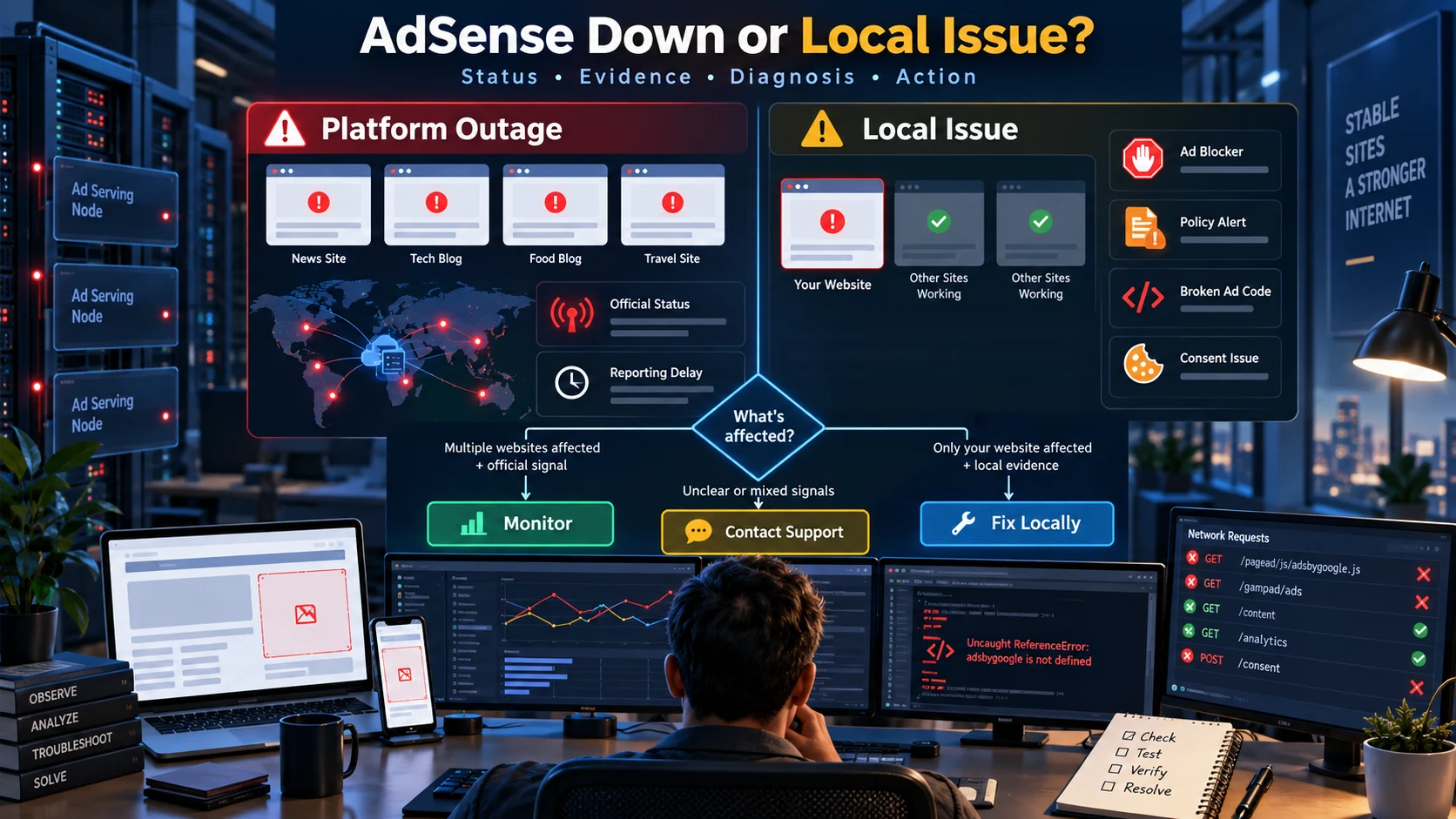
Google AdSense Down है या आपकी Website में Problem? Complete Outage Troubleshooting Guide
AdSense dashboard, ads या reports काम न करें तो platform outage और अपनी website, account, browser या ad code की problem में फर्क कैसे पहचानें—यह practical Hindi incident-response guide पढ़ें।
5 · Read blog
Claude से SEO कराते समय ये 10 गलतियां आपकी Rankings बिगाड़ सकती हैं
Claude keyword research, technical audit और content planning को तेज कर सकता है, लेकिन बिना verification उसके noindex, canonical, sitemap, title और link-building सुझाव rankings को नुकसान पहुंचा सकते हैं। जानिए 10 बड़े risks और सुरक्षित AI SEO workflow।
5 · Read blog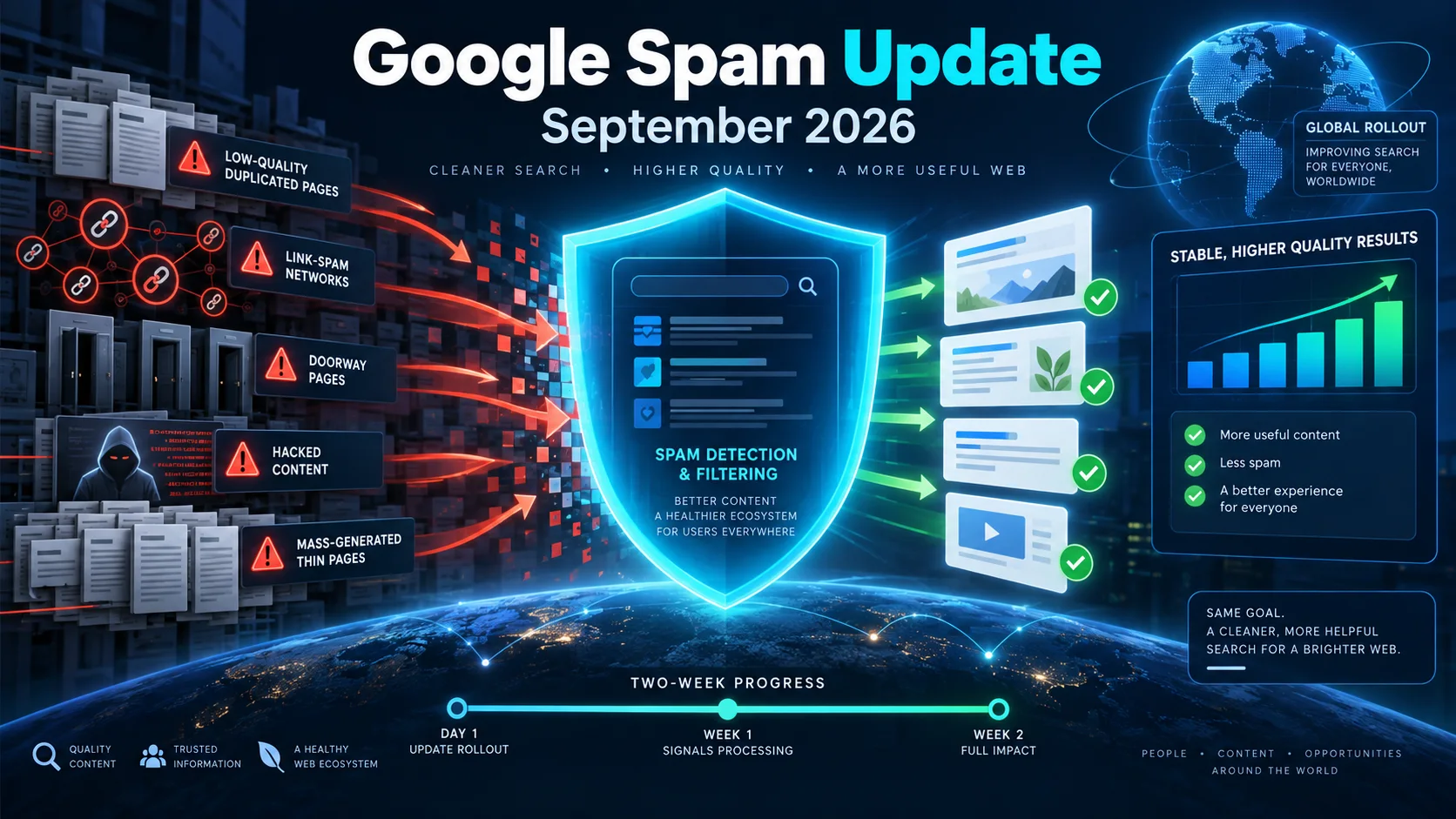
Google September 2026 Spam Update शुरू: Website Owners और SEO Professionals को क्या करना चाहिए?
Google ने September 2026 spam update का global rollout शुरू कर दिया है। यह सभी देशों और भाषाओं पर लागू है तथा पूरा होने में दो सप्ताह तक लग सकते हैं। जानिए rankings बदलने पर क्या जांचें, किन spam practices से बचें और recovery के लिए सही action plan क्या है।
5 · Read blog
AI Search Engines के लिए Website कैसे Optimize करें? Complete AEO/GEO Guide 2026
Google AI Overviews, AI Mode, ChatGPT Search और Bing में website की discoverability बढ़ाने के लिए technical SEO, content, entities, structured data और measurement की practical Hindi guide।
4 · Read blog
Comments 0
No comments yet. Be the first to share a useful thought.
Leave a comment
Your email address will not be published. Comments are reviewed before appearing. Web addresses are displayed as plain text and are never clickable.